How to Log Human Edits to AI Support Replies Without Building Another Dashboard
A lightweight review log gives a small support team the missing bridge between AI drafts and better operating rules. The point is not to track every keystroke. The point is to capture why humans keep changing drafts so the style guide, macros, and stop rules become sharper over time.
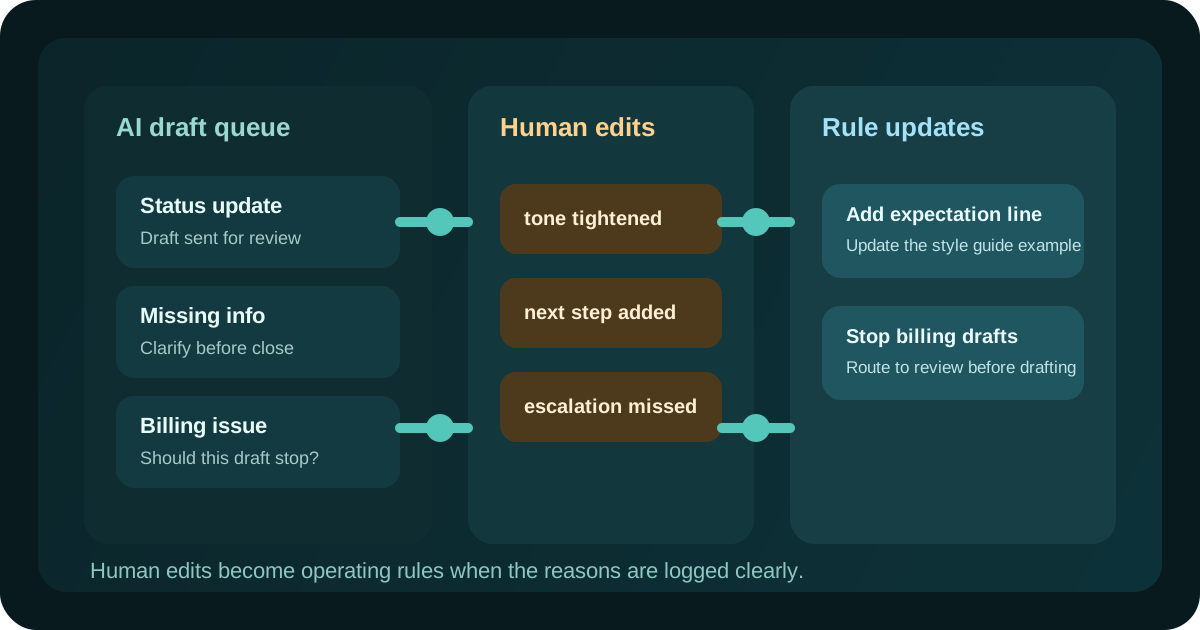
Log edit patterns, not every keystroke, so the review habit stays lightweight.
Tie each human change to a reason the style guide can absorb.
Promote repeated edits into new rules before prompt complexity grows.
Track the edit reason, not just the final message
Many teams save the final approved reply and stop there. That loses the most useful signal in the workflow: why the human changed the draft in the first place. A simple log should capture the original reply category, the approved version, and one short reason for the edit. Examples include missing expectation, tone too soft, escalation trigger missed, policy wording changed, or unnecessary detail removed. Those reasons are what help the system improve instead of merely documenting that a person fixed it.
Use a short reason code list
If every reviewer writes a different explanation, the log becomes noisy fast. Start with a short list of edit reasons the team can apply in a few seconds. A small operator team usually needs only five to seven codes such as tone, missing step, wrong routing, policy language, context gap, and escalation miss. The point is not perfect taxonomy. The point is making weekly review possible without turning the log into a second support job.
Separate style fixes from workflow failures
Not every human edit belongs in the same bucket. Some changes improve wording, while others reveal that the draft should never have been written automatically at all. Keep a visible distinction between style corrections and workflow failures. A style correction might tighten the opening line or remove repetition. A workflow failure might show that the case involved billing, account access, or an upset customer and should have triggered review before drafting. That distinction protects the team from polishing a workflow that actually needs a stronger stop rule.
Review the log once a week with one decision per pattern
The weekly review should stay narrow. Sort the log by repeated reason code, then make one decision for each pattern. If the same timing sentence keeps getting rewritten, update the style guide example. If escalation misses keep appearing, add or sharpen the trigger in the routing rules. If context gaps dominate, improve the intake form or the macro retrieval step. A useful review converts a pattern into one concrete rule change instead of opening a vague discussion about prompt quality.
Treat the log as an input to the guide, not a report archive
The value of the edit log is operational, not historical. After the review, move the useful outcome into the style guide, macro library, or triage SOP so the next draft starts from a better baseline. Once that happens, the log has done its job. This keeps the team focused on better workflow controls rather than building a reporting layer that records every correction but changes nothing upstream.